目录
RHCE8考试解法
- 题目要做在控制节点
- 关于提权一定要看看/etc/sudoers下的是否有设置免密
bashgreg ALL=(ALL) NOPASSWD: ALL
- 查看ansible模块的配置可以使用ansible-doc,例如:ansible-doc yum_repository
- 一定要学会使用ansible-doc查看文档
- 使用系统roles时,可以通过对应role目录下的README.md查看参数或使用参考
1. 安装和配置ansible

bash# 1. 配置软件安装环境
## 进入repo文件添加gpgcheck=0
sudo yum-config-managers --add-repo=http://content.exapmle.com/rhel8.0/x86_64/ucfupdates/

# 2. 安装ansible
sudo yum -y install ansible

# 3. 创建inventory文件(验证inventory:ansible -i inventory dev --list-hosts)
mkdir ~/ansible
vim ~/ansible/inventory
## 添加以下内容
node1
node2
node3
node4
node5

[dev]
node1

[test]
node2

[prod]
node3
node4

[balancers]
node5

[webservices:children]
prod

# 4. 创建ansible配置文件(如果忘记配置可以查看/etc/ansible/ansible.cfg)
vim ~/ansible/ansible.cfg
## 添加以下内容
[defaults]
inventory = /home/greg/ansible/inventory
roles_path = /home/greg/ansible/roles
remote_user = greg
ask_pass = false

[privilege_escalation]
become=true
become_method=sudo
become_user=root
become_ask_pass=false
## 可以用一下命令验证一下:ansible all -a 'id'
2. 创建和运行Ansible临时命令

bashvim ~/ansible/adhoc.sh

#!/bin/bash
ansible all -m yum_repository -a 'name="EX294_BASE" description="Ex294 base software" baseurl="http://repo.domainx.example.com/BaseOS" gpgcheck=yes gpgkey="http://repo.domainx.example.com/RPM-GPG-KEY-redhat-release"'
ansible all -m yum_repository -a 'name="EX294_STREAM" description="Ex294 stream software" baseurl="http://repo.domainx.example.com/AppStream" gpgcheck=yes gpgkey="http://repo.domainx.example.com/RPM-GPG-KEY-redhat-release"'

## 添加执行权限
chmod +x ~/ansible/adhoc.sh

## 运行后,检查现象
~/ansible/adhoc.sh
ansible all -a 'yum repolist'
3. 安装软件包

bashvim ~/ansible/packages.yml

# 1. 解法一
---
- name: Install pkg
  host: dev,test,prod
  tasks:
    - name: user yum install module to install pkg
      yum:
        name:
          - php
          - mariadb
        state: latest

- name: Install pkg
  host: dev
  tasks:
    - name: user yum install module to install devtools
      yum:
        name: "@RPM Development Tools"
        state: latest
    - name: update soft to latest
      yum:
        name: "*"
        state: latest


# 2. 解法二
---
- name: Install pkg
  host: dev,test,prod
  tasks:
    - name: user yum install module to install pkg
      yum:
        name:
          - php
          - mariadb
        state: latest
    - name: user yum install module to install devtools
      yum:
        name: "@RPM Development Tools"
        state: latest
      when: "'dev' in group_names"
    - name: update soft to latest
      yum:
        name: "*"
        state: latest
      when: "'dev' in group_names"

# 3. 验证
ansible all -m shell -a 'rpm -qa | grep php'
4. 使用RHEL系统Role

bash# 1. 需要安装软件包(查找软件包 yum list | grep role)
yum -y install rhel-system-roles
## 安装完后,会把roles安装到:/usr/share/ansible/roles/目录下
## 可以通过查看roles下的README.MD查看使用说明

# 2. 修改ansible.cfg,将安装的roles配置一下
vim ~/ansible/ansible.cfg

roles_path = /home/greg/ansible/roles:/usr/share/ansible/roles
## 使用 ansible-galaxy list 检查roles

# 3. 创建timesync.yml
vim ~/ansible/timesync.yml

---
- name: use system role
  hosts: all
  vars:
    timesync_ntp_servers:
      - hostname: 172.25.254.254
        iburst: yes
  roles:
    - rhel-system-roles.timesync

# 4.运行playbook(检查ntp:ansible all -m shell -a 'chronyc -n sources')
ansible-playbook timesync.yml

# 5. 创建selinux.yml
vim ~/ansible/selinux.yml

---
- name: set selinux
  hosts: all
  vars:
    selinux_policy: targeted
    selinux_state: enforcing
  roles:
    - rhel-system-roles.selinux
5. 使用Ansible Galaxy安装Role

bash# 1. 创建playbook(判断现象:ansible-galaxy list)
vim ~/ansible/requirements.yml

- src: http://rhgls.domainx.example.com/materials/haproxy.tar
  name: balancer

- src: http://rhgls.domainx.example.com/materials/phpinfo.tar
  name: phpinfo

# 2. 安装roles
ansible-galaxy install -r ~/ansible/requirements.yml

# 3. 注意拷贝requirements.yml到roles/目录下
cp ~/ansible/requirements.yml ~/ansible/roles/requirements.yml
6. 创建一个web role

获取Facts变量:ansible node1 -m setup >> node1.json
bash# 1. 进入到roles目录,初始化roles
cd ~/ansible/roles
ansible-galaxy init apache

# 2. 创建模板文件
vim ~/ansible/roles/apache/templates/index.html.j2
Welcom to {{ansible_fqdn}} on {{ansible_default_ipv4['address']}}

# 3. 创建main
vim ~/ansible/roles/apache/tasks/main.yml

---
- name: install pkg
  yum:
    name: httpd
    state: latest

- name: set httpd service
  service:
    name: httpd
    state: started
    enabled: yes

- name: set firewalld service
  service:
    name: firewalld
    state: started
    enabled: yes

- name: set firewall to allow http traffic
  firewalld:
    service: http
    immediate: yes
    permanent: yes
    state: enabled

- name: set web content
  template:
    src: index.html.j2
    dest: /var/www/html/index.html

# 4. 创建playbook
vim ~/ansible/apache.yml

---
- name: use apache role
  host: webservers
  roles:
    - apache

# 5. 运行playbook
ansible-playbook ~/ansible/apache.yml

# 6. 验证
curl node3.domainx.example.com
curl node4.domainx.example.com
7. 从ansible galaxy使用role
注意查看node5上防火墙是否有放行80端口

bash# 1. 编写playbook
vim ~/ansible/roles.yml

---
- name: use phpinfo role
  hosts: webservers
  roles:
    - phpinfo

- name: user haproxy role
  hosts: balancers
  roles:
    - balancer

- name: set firewalld
  hosts: balancers
  tasks:
    - name: set firewall http
      firewalld:
        service: http
        immediate: yes
        permanent: yes
        state: enabled


 # 2. 运行playbook
 ansible-playbook ~/ansible/roles.yml
8. 创建和使用逻辑卷-A

bash# 1. 创建lv.yml
vim ~/ansible/lv.yml

---
- name: create lv
  hosts: all
  tasks:
    - block:
      - name: create a lv use research vg
        lvol:
          vg: research
          lv: data
          size: 1500
      - name: format ext4 fs
        filesystem:
          fstype: ext4
          dev: /dev/research/data

      rescue:
        - name: output some info
          debug:
            msg: Could not create logical volume of that size
          when: ansible_lvm.vgs.research is defined
        - name: create a lv research vg
          lvol:
            vg: research
            lv: data
            size: 800
          when: ansible_lvm.vgs.research is defined
        - name: format ext4 fs
          filesystem:
            fstype: ext4
            dev: /dev/research/data
          when: ansible_lvm.vgs.research is defined
        - name: output some info
          debug:
            msg: Volume group does not exist
          when: ansible_lvm.vgs.research is undefined


# 2. 执行playbook
ansible-playbook ~/ansible/lv.yml

# 3. 验证
ansible all -a 'lvs'
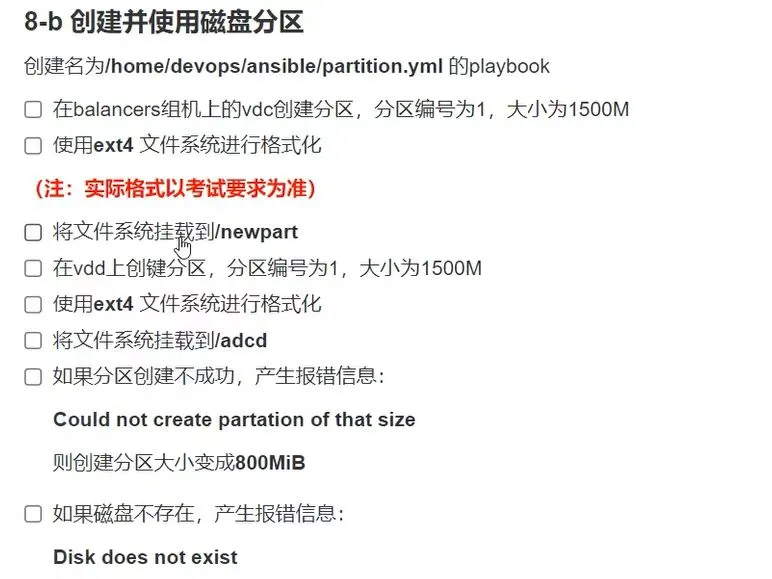
8. 创建并使用磁盘分区-B
bash
9. 生成主机文件

bash# 1. 下载文件
wget http://rhgls.domainx.example.com/materials/hosts.j2

# 2. 编辑hosts.j2模板
vim ~/ansible/hosts.j2

127.0.0.1 localhost localhost.localdomain localhost4 localhost4.localdomain4
::1 localhost localhost.localdomain localhost6 localhost6.localdomain6
{% for host in groups['all'] %}
{{ hostvars[host]['ansible_default_ipv4']['address'] }} {{ hostvars[host]['ansible_fqdn'] }} {{ hostvars[host]['ansible_hostname'] }}
{% endfor %}

# 3. 创建hosts.yml的playbook
vim ~/ansible/hosts.yml

---
- name: create a host file
  hosts: all
  tasks:
    - name: template a host file
      template:
        src: hosts.j2
        dest: /etc/myhosts
      when: '"dev" in group_names'

# 4. 运行playbook
ansible-playbook hosts.yml

# 5. 验证
ansible dev -a 'cat /etc/myhosts'
10. 修改文件内容

bash# 1. 欻关键issue.yml的playbook
vim ~/ansible/issue.yml
---
- name: modify file content
  hosts: all
  tasks:
    - copy:
        content: Development
        dest: /etc/issue
      when: '"dev" in group_names'
    - copy:
        content: Test
        dest: /etc/issue
      when: '"test" in group_names'
    - copy:
        content: Production
        dest: /etc/issue
      when: '"prod" in group_names'

# 2. 运行playbook
ansible-playbook ~/ansible/issue.yml

# 3. 检查
ansible all -a 'cat /etc/issue'
11. 创建web内容目录

bash# 1. 创建webcontent.yml的playbook
vim ~/ansible/webcontent.yml

---
- name: set web content
  hosts: dev
  tasks:
    - name: create a directory
      file:
        path: /webdev
        state: directory
        group: webdev
        mode: "2775"
        setype: httpd_sys_content_t
    - name: create a soft link
      file:
        src: /webdev
        dest: /var/www/html/webdev
        state: link
    - name: set web content
      copy:
        content: Development
        dest: /web/dev/index.html
        setype: http_sys_content_t
    - name: start httpd service
      service:
        name: httpd
        state: started
        enabled: yes

    - name: set firewall allow http traffic
      firewalld:
        service: http
        permanent: yes
        immediate: yes
        state: enable

# 2. 运行playbook
ansible-playbook ~/ansible/webcontent.yml

# 3. 检验
curl http://node1.domainx.example.com/webdev/
12. 生成硬件报告

bash# 1. 创建hwreport.yml的playbook
vim ~/ansible/hwreport.yml

---
- name: create hardware report
  hosts: all
  vars:
    hardware:
      - hw_name: HOST
        hw_info: "{{ ansible_hostname }}"
      - hw_name: MEMORY
        hw_info: "{{ ansible_memtotal_mb }}"
      - hw_name: BIOS
        hw_info: "{{ ansible_bios_version }}"
      - hw_name: DISK_SIZE_VDA
        hw_info: "{{ andible_devices['vda']['size'] | default('NONE')}}"
      - hw_name: DISK_SIZE_VDB
        hw_info: "{{ andible_devices['vdb']['size'] | default('NONE')}}"
  tasks:
    - name: get hw report from url
      get_url:
        url: http://rhgls.domainx.example.com/materials/hwreport.empty
        dest: /root/hwreport.txt
    - name: set hw repot content
      lineinfile:
        path: /root/hwreport.txt
        line: "{{ item['hw_name']}}={{ item['hw_info'] }}"
      loop: "{{ hardware }}"

# 2. 运行playbook
ansible-playbook ~/ansible/hwreport.yml

# 3. 验证
ansible all -a 'cat /root/hwreport.txt'
13. 使用ansible vault

bash# 1. 创建secrete.txt存放密码
echo whenyouwishuponastar > ~/ansible/secret.txt

# 2. 创建locker.yml
vim ~/ansible/locker.yml

pw_developer: Imadev
pw_manager: Imamgr

# 3. 加密locker.yml
ansible-vault encrypt --vault-id=~/ansible/secret.txt locker.yml

# 3. 加密locker.yml
ansible-vault view --vault-id=~/ansible/secret.txt locker.yml

# 4. 检查
cat ~/ansible/locker.yml
14. 创建批量添加用户Role

bash# 1. 下载
wget  http://rhgls.domainx.example.com/materials/user_list.yml

# 2. 创建 user_list.yml 的playbok
vim ~/ansible/users.yml

---
- name: create user on dev and test
  hosts: dev,test
  vars_files:
    - locker.yml
    - user_list.yml
  tasks:
    - name: create group
      group:
        name: devops
        state: present
    - name: cretae user
      user:
        name: "{{ item['name'] }}"
        password: "{{ pw_developer | password_hash('sha512', 'mysecretsalt') }}"
        groups: devops
        expires: "{{item.password_expire_MAX}}"
      loop: "{{ users  }}"
      when: item.job == 'developer'

- name: create user on prod
  hosts: prod
  vars_files:
    - locker.yml
    - user_list.yml
  tasks:
    - name: create group
      group:
        name: opsmgr
        state: present
    - name: create user
      user:
        name: "{{ item['name'] }}"
        password: "{{ pw_manager | password_hash('sha512', 'mysecretsalt') }}"
        groups: opsmgr
        uid: 6666
        expires: "{{item.password_expire_MAX}}"
      loop: "{{ users  }}"
      when: item.job == 'manager'

# 2. 执行playbook
ansible-playbook --vault-id=~/ansible/secret.txt ~/ansible/users.yml

# 4. 验证
ansible dev -a 'id gzy001'
15. 重新设置Ansible vault密码

bash# 1. 下载salaries.yml
wget http://rhgls.domainx.example.com/materials/salaries.yml

# 2. 修改密码
ansible-vault rekey salaries.yml

# 3. 用新密码验证
ansible-vault view salaries.yml
16. 创建定时任务

bash# 1. 创建 cron.yml 的playbok
vim ~/ansible/cron.yml

---
- name: create cron
  hosts: all
  tasks:
    - name: create user natasha
      user:
        name: natasha
        state: present
    - name: create cron
      cron:
        user: natasha
        job: 'Loggr "EX294 in progress"'
        minute: "*/2"

# 2. 执行playbook
ansible-playbook ~/ansible/cron.yml

# 3. 验证
ansible all -a 'crontab -l -u natasha'
本文作者:wucc
本文链接:
版权声明:本博客所有文章除特别声明外,均采用 BY-SA 许可协议。转载请注明出处!
目录